My Countingdown

Showing posts with label Frame Relay. Show all posts

Monday, January 2, 2012

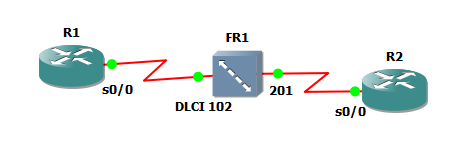
Lab 10. Frame Relay Bridging


R1#
bridge irb
bridge 1 protocol ieee
bridge 1 route ip
!
interface FastEthernet0/0
 no ip address
 duplex auto
 speed auto
 bridge-group 1
!
interface Serial0/0
 no ip address
 encapsulation frame-relay
 clock rate 2000000
 frame-relay map bridge 102 broadcast
 bridge-group 1
!
interface BVI1
 ip address 12.12.12.11 255.255.255.0

R2#
bridge irb
bridge 1 protocol ieee
bridge 1 route ip

interface FastEthernet0/0
 no ip address
 duplex auto
 speed auto
 bridge-group 1
!
interface Serial0/0
 no ip address
 encapsulation frame-relay
 clock rate 2000000
 frame-relay map bridge 201 broadcast

interface BVI1
 ip address 12.12.12.12 255.255.255.0

FR#
frame-relay switching
! 
interface Serial0/0
 no ip address
 encapsulation frame-relay
 clock rate 2000000
 frame-relay lmi-type cisco
 frame-relay intf-type dce
 frame-relay route 102 interface Serial0/1 201
!
interface Serial0/1
 no ip address
 encapsulation frame-relay
 clock rate 2000000
 frame-relay lmi-type cisco
 frame-relay intf-type dce
 frame-relay route 201 interface Serial0/0 102

Check frame-relay mapping

R1(config-if)#do sh fram map  
Serial0/0 (up): bridge dlci 102(0x66,0x1860), static,
              broadcast,
              CISCO, status defined, active

R2(config-if)# do sh fram map
Serial0/0 (up): bridge dlci 201(0xC9,0x3090), static,
              broadcast,
              CISCO, status defined, active

Thursday, December 8, 2011

Lab 12. Frame Relay – Multilink PPP


We can use authentication in frame relay using PPP over frame relay. Besides, we can bundle some links with PPP multilink

R1#
username R2 password cisco
!
interface Serial0/0
no ip address
encapsulation frame-relay
clock rate 2000000
frame-relay interface-dlci 103 ppp Virtual-Template1
!
interface Serial0/1
no ip address
encapsulation frame-relay
clock rate 2000000
frame-relay interface-dlci 204 ppp Virtual-Template1
!
interface Virtual-Template1
ip address 12.12.12.1 255.255.255.0
ppp authentication chap
ppp multilink

R2#
username R1 password cisco
!
interface Serial0/0
no ip address
encapsulation frame-relay
clock rate 2000000
frame-relay interface-dlci 301 ppp Virtual-Template1
!
interface Serial0/1
no ip address
encapsulation frame-relay
clock rate 2000000
frame-relay interface-dlci 402 ppp Virtual-Template1
!
interface Virtual-Template1
ip address 12.12.12.2 255.255.255.0
ppp authentication chap
ppp multilink

FR#
FR#sh run | sec Serial
interface Serial0/0
no ip address
encapsulation frame-relay
clock rate 128000
frame-relay lmi-type cisco
frame-relay intf-type dce
frame-relay route 103 interface Serial0/2 301
interface Serial0/1
no ip address
encapsulation frame-relay
clock rate 128000
frame-relay lmi-type cisco
frame-relay intf-type dce
frame-relay route 204 interface Serial0/3 402
interface Serial0/2
no ip address
encapsulation frame-relay
clock rate 128000
frame-relay lmi-type cisco
frame-relay intf-type dce
frame-relay route 301 interface Serial0/0 103
interface Serial0/3
no ip address
encapsulation frame-relay
clock rate 128000
frame-relay lmi-type cisco
frame-relay intf-type dce
frame-relay route 402 interface Serial0/1 204

Verify the ppp multilink

R1#sh ppp multilink
Virtual-Access4
Bundle name: R2
Remote Username: R2
Remote Endpoint Discriminator: [1] R2
Local Username: R1
Local Endpoint Discriminator: [1] R1
Bundle up for 00:07:18, total bandwidth 200000, load 1/255
Receive buffer limit 24384 bytes, frag timeout 1000 ms
0/0 fragments/bytes in reassembly list
0 lost fragments, 0 reordered
0/0 discarded fragments/bytes, 0 lost received
0x0 received sequence, 0x1 sent sequence
Member links: 2 (max not set, min not set)
Vi1, since 00:07:18
Vi2, since 00:07:18
No inactive multilink interfaces

R2#sh pp mult
Virtual-Access4
Bundle name: R1
Remote Username: R1
Remote Endpoint Discriminator: [1] R1
Local Username: R2
Local Endpoint Discriminator: [1] R2
Bundle up for 00:08:10, total bandwidth 200000, load 1/255
Receive buffer limit 24384 bytes, frag timeout 1000 ms
0/0 fragments/bytes in reassembly list
0 lost fragments, 0 reordered
0/0 discarded fragments/bytes, 0 lost received
0x1 received sequence, 0x0 sent sequence
Member links: 2 (max not set, min not set)
Vi1, since 00:08:11
Vi2, since 00:08:10
No inactive multilink interfaces

R2#sh ip int brie
Interface                IP-Address OK? Method      Status                          Protocol
FastEthernet0/0     unassigned   YES NVRAM    administratively down  down
Serial0/0                unassigned   YES NVRAM    up                               up
FastEthernet0/1     unassigned   YES NVRAM    administratively down  down
Serial0/1                unassigned  YES NVRAM     up                               up
Virtual-Access1    12.12.12.2  YES TFTP           up                               up
Virtual-Template1 12.12.12.2  YES NVRAM     down                          down
Virtual-Access2    12.12.12.2  YES TFTP          up                                up
Virtual-Access3    unassigned  YES unset            down                          down
Virtual-Access4    12.12.12.2 YES TFTP           up                               up

R2#ping 12.12.12.1
Type escape sequence to abort.
Sending 5, 100-byte ICMP Echos to 12.12.12.1, timeout is 2 seconds:
!!!!!
Success rate is 100 percent (5/5), round-trip min/avg/max = 24/42/64 ms

If we want to use username, we can do:

R1(config)#do sh run int virtual-tem1
Building configuration...

Current configuration : 113 bytes
!
interface Virtual-Template1
ip address 12.12.12.1 255.255.255.0
ppp authentication chap
ppp multilink
end

R1(config)#int virtual-tem1
R1(config-if)#ppp chap hostname Bandung
R1(config-if)#
*Mar 1 00:11:58.867: %LINK-3-UPDOWN: Interface Virtual-Access4, changed state to down
*Mar 1 00:11:59.095: %LINEPROTO-5-UPDOWN: Line protocol on Interface Virtual-Access1, changed state to down
*Mar 1 00:11:59.111: %LINEPROTO-5-UPDOWN: Line protocol on Interface Virtual-Access2, changed state to down
*Mar 1 00:11:59.867: %LINEPROTO-5-UPDOWN: Line protocol on Interface Virtual-Access4, changed state to down
R1(config-if)#username Jakarta password jkt

R2(config)#userna Bandung passw bdg
R2(config)#do sh run int virtual-tem1
Building configuration...
Current configuration : 113 bytes
!
interface Virtual-Template1
ip address 12.12.12.2 255.255.255.0
ppp authentication chap
ppp multilink
end

R2(config)#int virtual-tem1
R2(config-if)#ppp chap hostn Jakarta

Check the multilink!

R1(config)#do sh ppp multi
No active bundles
No inactive multilink interfaces

R2(config-if)#do sh ppp multi
No active bundles
No inactive multilink interfaces

Oups, there is no multilink. It’s because the password is different

R1(config)#username Jakarta password sama
R2(config-if)#userna Bandung passw sama

*Mar 1 00:14:28.491: %LINEPROTO-5-UPDOWN: Line protocol on Interface Virtual-Access2, changed state to up
*Mar 1 00:14:28.587: %LINEPROTO-5-UPDOWN: Line protocol on Interface Virtual-Access4, changed state to up
*Mar 1 00:14:29.131: %LINEPROTO-5-UPDOWN: Line protocol on Interface Virtual-Access1, changed state to up

Now, check again the ppp multilink

R2(config)#do sh ppp multi
Virtual-Access4
Bundle name: Bandung
Remote Username: Bandung
Remote Endpoint Discriminator: [1] Bandung
Local Username: Jakarta
Local Endpoint Discriminator: [1] Jakarta
Bundle up for 00:04:54, total bandwidth 200000, load 1/255
Receive buffer limit 24384 bytes, frag timeout 1000 ms
0/0 fragments/bytes in reassembly list
0 lost fragments, 0 reordered
0/0 discarded fragments/bytes, 0 lost received
0x0 received sequence, 0x0 sent sequence
Member links: 2 (max not set, min not set)
Vi2, since 00:04:54
Vi1, since 00:04:54
No inactive multilink interfaces

R2(config)#do ping 12.12.12.1
Type escape sequence to abort.
Sending 5, 100-byte ICMP Echos to 12.12.12.1, timeout is 2 seconds:
!!!!!
Success rate is 100 percent (5/5), round-trip min/avg/max = 1/27/48 ms

Lab 11. Frame Relay End to End Keepalive


This lab to show if we have 2 links with the same source and destination where one only using Serial and another using Frame Relay. We want the frame relay is as the main. Then if frame relay down, the backup will take over the traffic

R1#
interface Serial0/0
no ip address
encapsulation frame-relay

interface Serial0/0.1 point-to-point
backup interface Serial0/1
ip address 12.12.12.1 255.255.255.0
frame-relay interface-dlci 102
class KEEP_ALIVE

interface Serial0/1
ip address 21.21.21.1 255.255.255.0

router eigrp 1
network 0.0.0.0
auto-summary

map-class frame-relay KEEP_ALIVE
frame-relay end-to-end keepalive mode bidirectional

R2#
interface Serial0/0
no ip address
encapsulation frame-relay
no frame-relay inverse-arp

interface Serial0/0.1 point-to-point
ip address 12.12.12.2 255.255.255.0
frame-relay interface-dlci 201
class KEEP_ALIVE

interface Serial0/1
ip address 21.21.21.2 255.255.255.0

router eigrp 1
network 0.0.0.0
auto-summary

map-class frame-relay KEEP_ALIVE
frame-relay end-to-end keepalive mode bidirectional

Check frame keep alive

R1#sh fram end keepaliv
End-to-end Keepalive Statistics for Interface Serial0/0 (Frame Relay DTE)

DLCI = 102, DLCI USAGE = LOCAL, VC STATUS = ACTIVE (EEK UP)

SEND SIDE STATISTICS
Send Sequence Number: 52, Receive Sequence Number: 53
Configured Event Window: 3, Configured Error Threshold: 2
Total Observed Events: 55, Total Observed Errors: 0
Monitored Events: 3, Monitored Errors: 0
Successive Successes: 3, End-to-end VC Status: UP

RECEIVE SIDE STATISTICS
Send Sequence Number: 53, Receive Sequence Number: 52
Configured Event Window: 3, Configured Error Threshold: 2
Total Observed Events: 54, Total Observed Errors: 0
Monitored Events: 3, Monitored Errors: 0
Successive Successes: 3, End-to-end VC Status: UP

R1#sh int des
Interface Status              Protocol      Description
Fa0/0     admin down     down
Se0/0     up                    up
Se0/0.1  up                    up
Fa0/1     admin down     down
Se0/1     standby mode  down

R1#sh ip int brie
Interface              IP-Address  OK?  Method     Status                          Protocol
FastEthernet0/0   unassigned   YES   NVRAM   administratively down  down
Serial0/0             unassigned   YES    NVRAM   up                               up
Serial0/0.1          12.12.12.1  YES    NVRAM   up                               up
FastEthernet0/1   unassigned  YES    NVRAM   administratively down  down
Serial0/1             21.21.21.1  YES    NVRAM   standby mode             down

R2#sh fram end keep
End-to-end Keepalive Statistics for Interface Serial0/0 (Frame Relay DTE)

DLCI = 201, DLCI USAGE = LOCAL, VC STATUS = ACTIVE (EEK UP)
SEND SIDE STATISTICS

Send Sequence Number: 65, Receive Sequence Number: 66
Configured Event Window: 3, Configured Error Threshold: 2
Total Observed Events: 68, Total Observed Errors: 0
Monitored Events: 3, Monitored Errors: 0
Successive Successes: 3, End-to-end VC Status: UP

RECEIVE SIDE STATISTICS
Send Sequence Number: 66, Receive Sequence Number: 65
Configured Event Window: 3, Configured Error Threshold: 2
Total Observed Events: 68, Total Observed Errors: 0
Monitored Events: 3, Monitored Errors: 0
Successive Successes: 3, End-to-end VC Status: UP

R2#sh int des
Interface Status              Protocol Description
Fa0/0      admin down    down
Se0/0      up                   up
Se0/0.1   up                   up
Fa0/1      admin down    down
Se0/1      up                  down

R2#sh ip int bri
Interface               IP-Address  OK? Method   Status                        Protocol
FastEthernet0/0    unassigned    YES NVRAM administratively down down
Serial0/0               unassigned   YES NVRAM up                               up
Serial0/0.1           12.12.12.2   YES NVRAM up                               up
FastEthernet0/1    unassigned   YES NVRAM administratively down  down
Serial0/1               21.21.21.2  YES NVRAM up                               down

Let’s test is the backup work! Do shutdown interface s0/0 in R2

R2(config)#int s0/0
R2(config-if)#shut
R2(config-if)#
*Mar 1 00:15:07.311: %DUAL-5-NBRCHANGE: IP-EIGRP(0) 1: Neighbor 12.12.12.1 (Serial0/0.1) is down: interface down
*Mar 1 00:15:09.283: %LINK-5-CHANGED: Interface Serial0/0, changed state to administratively down
*Mar 1 00:15:10.283: %LINEPROTO-5-UPDOWN: Line protocol on Interface Serial0/0, changed state to down

Wait a second the backup interface will going to up!

R2#
*Mar 1 00:15:47.503: %LINEPROTO-5-UPDOWN: Line protocol on Interface Serial0/1, changed state to up
*Mar 1 00:15:47.959: %DUAL-5-NBRCHANGE: IP-EIGRP(0) 1: Neighbor 21.21.21.1 (Serial0/1) is up: new adjacency


R1#
*Mar 1 00:15:17.035: %DUAL-5-NBRCHANGE: IP-EIGRP(0) 1: Neighbor 12.12.12.2 (Serial0/0.1) is down: holding time expired
*Mar 1 00:15:29.563: %FR_EEK-5-FAILED: Interface Serial0/0.1 - DLCI 102

In R1, int s0/1 will going to up as before the status is standby mode

*Mar 1 00:15:31.971: %LINK-3-UPDOWN: Interface Serial0/1, changed state to up
*Mar 1 00:15:32.979: %LINEPROTO-5-UPDOWN: Line protocol on Interface Serial0/1, changed state to up

*Mar 1 00:15:46.991: %DUAL-5-NBRCHANGE: IP-EIGRP(0) 1: Neighbor 21.21.21.2 (Serial0/1) is up: new adjacency

R1#sh fram end keepaliv
End-to-end Keepalive Statistics for Interface Serial0/0 (Frame Relay DTE)

DLCI = 102, DLCI USAGE = LOCAL, VC STATUS = ACTIVE (EEK DOWN)

SEND SIDE STATISTICS
Send Sequence Number: 100, Receive Sequence Number: 84
Configured Event Window: 3, Configured Error Threshold: 2
Total Observed Events: 102, Total Observed Errors: 16
Monitored Events: 3, Monitored Errors: 3
Successive Successes: 0, End-to-end VC Status: DOWN

RECEIVE SIDE STATISTICS
Send Sequence Number: 84, Receive Sequence Number: 83
Configured Event Window: 3, Configured Error Threshold: 2
Total Observed Events: 96, Total Observed Errors: 11
Monitored Events: 3, Monitored Errors: 3
Successive Successes: 0, End-to-end VC Status: DOWN
Failures Since Started: 1, Last Failure: 00:02:29

R1#sh ip int brie
Interface            IP-Address OK? Method Status                        Protocol
FastEthernet0/0 unassigned YES NVRAM administratively down down
Serial0/0           unassigned YES NVRAM up                              up
Serial0/0.1        12.12.12.1 YES NVRAM down                        down
FastEthernet0/1 unassigned YES NVRAM administratively down down
Serial0/1           21.21.21.1 YES NVRAM up                              up

R2#sh fram end keep
End-to-end Keepalive Statistics for Interface Serial0/0 (Frame Relay DTE)

R2#sh ip int bri
Interface            IP-Address OK? Method   Status                        Protocol
FastEthernet0/0 unassigned   YES NVRAM administratively down down
Serial0/0           unassigned   YES NVRAM administratively down down
Serial0/0.1        12.12.12.2  YES NVRAM administratively down down
FastEthernet0/1 unassigned  YES NVRAM administratively down down
Serial0/1           21.21.21.2  YES NVRAM up                              up

Without this, the backup interface will be still in standby mode!

Lab 9. Frame Relay (Main Interface Mapping + Multipoint Subinterface: Static Mapping)


R1#sh run | sec Serial0/0
interface Serial0/0
no ip address
encapsulation frame-relay

interface Serial0/0.1 point-to-point
ip address 12.12.12.1 255.255.255.0
frame-relay interface-dlci 102

R2#sh run | sec Serial0/0
interface Serial0/0
ip address 12.12.12.2 255.255.255.0
encapsulation frame-relay
frame-relay map ip 12.12.12.1 201 broadcast

Let's check the mapping

R1#sh fram map
Serial0/0.1 (up): point-to-point dlci, dlci 102(0x66,0x1860), broadcast
status defined, active

R2#sh fram map
Serial0/0 (up): ip 12.12.12.1 dlci 201(0xC9,0x3090), static,
broadcast,
CISCO, status defined, active

R1 does not need mapping to specific IP as using point-to-point subinterface but R2 need mapping as using static mapping.

Lab 8. Frame Relay (Point-to-point Subinterface + Main Interface: Static Mapping)


R1#sh run | Sec Serial0/0
interface Serial0/0
no ip address
encapsulation frame-relay

interface Serial0/0.1 point-to-point
ip address 12.12.12.1 255.255.255.0
frame-relay interface-dlci 102

R2#sh run | sec Serial0/0
interface Serial0/0
ip address 12.12.12.2 255.255.255.0
encapsulation frame-relay
frame-relay map ip 12.12.12.1 201 broadcast

R1#sh fram map
Serial0/0.1 (down): point-to-point dlci, dlci 102(0x66,0x1860), broadcast
status deleted

Opsss, the status is deleted??? Just wait for a moment :(
If it’s still deleted, just check the mapping!
Then we have

R1#sh fram map
Serial0/0.1 (up): point-to-point dlci, dlci 102(0x66,0x1860), broadcast
status defined, active

R2#sh fram map
Serial0/0 (up): ip 12.12.12.1 dlci 201(0xC9,0x3090), static,
broadcast,
CISCO, status defined, active

R2#ping 12.12.12.1
Type escape sequence to abort.
Sending 5, 100-byte ICMP Echos to 12.12.12.1, timeout is 2 seconds:
!!!!!
Success rate is 100 percent (5/5), round-trip min/avg/max = 4/24/48 ms

Lab 7. Frame Relay (Point-to-Point Subinterface + Main Interface using Inverse-ARP)


Below is configuration for frame relay (point-to-point subinterface + main interface using Inverse-ARP)

R1#sh run | sec Serial0/0
interface Serial0/0
no ip address
encapsulation frame-relay

interface Serial0/0.1 point-to-point
ip address 12.12.12.1 255.255.255.0
frame-relay interface-dlci 102

R2#sh run | sec Serial0/0
interface Serial0/0
no ip address
encapsulation frame-relay

interface Serial0/0.1 point-to-point
ip address 12.12.12.2 255.255.255.0
frame-relay interface-dlci 201

R1 & R2 is still using subinterface point-to-point. Let’s change R2 using main interface: Inverse-ARP.

R2(config)#no int s0/0.1
Not all config may be removed and may reappear after reactivating the sub-interface
R2(config)#do sh ip int brie
Interface            IP-Address OK? Method   Status                         Protocol
FastEthernet0/0 unassigned   YES NVRAM administratively down down
Serial0/0            unassigned  YES NVRAM  up                               up
Serial0/0.1         unassigned  YES NVRAM  deleted                       down
FastEthernet0/1 unassigned  YES NVRAM  administratively down  down
Serial0/1            unassigned  YES NVRAM administratively down  down
R2(config)#do sh run int s0/0
Building configuration...
Current configuration : 89 bytes
!
interface Serial0/0
no ip address
encapsulation frame-relay
clock rate 2000000
end

R2(config)#int s0/0
R2(config-if)#ip add 12.12.12.2 255.255.255.0
R2(config-if)#do sh run | Sec Serial0/0
interface Serial0/0
ip address 12.12.12.2 255.255.255.0
encapsulation frame-relay
clock rate 2000000

If we see, the subinterface is till there even we already delete. So we can not change subinterface to multipoint and the description will be there unless we do router ‘reload’.

R2(config-if)#do sh fram map
Serial0/0 (up): ip 12.12.12.1 dlci 201(0xC9,0x3090), dynamic,
broadcast,
CISCO, status defined, active

R1#sh fram map
Serial0/0.1 (up): point-to-point dlci, dlci 102(0x66,0x1860), broadcast
status defined, active

Check the ping is it still ok or not!

R1#ping 12.12.12.2
Type escape sequence to abort.
Sending 5, 100-byte ICMP Echos to 12.12.12.2, timeout is 2 seconds:
!!!!!
Success rate is 100 percent (5/5), round-trip min/avg/max = 4/16/44 ms

Monday, December 5, 2011

Lab 6. Frame Relay Point-to-Point Subinterface


Now let's make frame relay point-to-pont using subinterface

R1(config)#int s0/0
R1(config-if)#no shu
*Mar 1 00:00:56.919: %LINK-3-UPDOWN: Interface Serial0/0, changed state to up
*Mar 1 00:00:57.927: %LINEPROTO-5-UPDOWN: Line protocol on Interface Serial0/0, changed state to up
R1(config-if)#encap frame-relay
R1(config-if)#int s0/0.1 point-to-point
R1(config-subif)#ip add 12.12.12.1 255.255.255.0
R1(config-subif)#fram inte 102
R1(config-fr-dlci)#
*Mar 1 00:01:43.251: %LINEPROTO-5-UPDOWN: Line protocol on Interface Serial0/0, changed state to down
*Mar 1 00:02:03.251: %LINEPROTO-5-UPDOWN: Line protocol on Interface Serial0/0, changed state to up

R2(config)#int s0/0
R2(config-if)#no shu
*Mar 1 00:02:23.383: %LINK-3-UPDOWN: Interface Serial0/0, changed state to upn
*Mar 1 00:02:24.391: %LINEPROTO-5-UPDOWN: Line protocol on Interface Serial0/0, changed state to up
R2(config-if)#encap fram
R2(config-if)#int s0/0.1 point-to-point
R2(config-subif)#ip add 12.12.12.2 255.255.255.0
R2(config-subif)#fram int 201
R2(config-fr-dlci)#
*Mar 1 00:03:07.719: %LINEPROTO-5-UPDOWN: Line protocol on Interface Serial0/0, changed state to down
*Mar 1 00:03:27.719: %LINEPROTO-5-UPDOWN: Line protocol on Interface Serial0/0, changed state to up

Let's check the map, pvc, and ping

R1(config-fr-dlci)#do sh fram map
Serial0/0.1 (up): point-to-point dlci, dlci 102(0x66,0x1860), broadcast
status defined, active

R2(config-fr-dlci)#do sh fram map
Serial0/0.1 (up): point-to-point dlci, dlci 201(0xC9,0x3090), broadcast
status defined, active

R2(config-fr-dlci)#do ping 12.12.12.1
Type escape sequence to abort.
Sending 5, 100-byte ICMP Echos to 12.12.12.1, timeout is 2 seconds:
!!!!!
Success rate is 100 percent (5/5), round-trip min/avg/max = 1/17/44 ms

Lab 5. Frame Relay Multipoint Subinterface – Static Mapping + Inverse-ARP

Here we’ll try to combine frame relay subinterface with multipoint using Dynamic and Static Mapping. R1 using static mapping & R2 using dynamic mapping.


R1#sh run | sec Serial0/0
interface Serial0/0
no ip address
encapsulation frame-relay
clock rate 2000000
interface Serial0/0.1 multipoint
ip address 12.12.12.1 255.255.255.0
snmp trap link-status
frame-relay map ip 12.12.12.2 102 broadcast             --- > static mapping

R2#sh run | Sec Serial0/0
interface Serial0/0
no ip address
encapsulation frame-relay
clock rate 2000000
interface Serial0/0.1 multipoint
ip address 12.12.12.2 255.255.255.0
snmp trap link-status
frame-relay interface-dlci 201                                 --- > dynamic mapping

R2#sh fram map
Serial0/0.1 (up): ip 12.12.12.1 dlci 201(0xC9,0x3090), dynamic,
broadcast,, status defined, active

R1#sh fram map
Serial0/0.1 (up): ip 12.12.12.2 dlci 102(0x66,0x1860), static,
broadcast,
CISCO, status defined, active

Make sure the ping is ok

R1#ping 12.12.12.2
Type escape sequence to abort.
Sending 5, 100-byte ICMP Echos to 12.12.12.2, timeout is 2 seconds:
!!!!!
Success rate is 100 percent (5/5), round-trip min/avg/max = 1/15/36 ms

Lab 4. Frame Relay Multipoint Subinterface – Static Mapping

Here the topology and configuration for frame relay multipoint using subinterface - static mapping.


R1(config)#do sh run | sec Serial0/0
interface Serial0/0
no ip address
encapsulation frame-relay
clock rate 2000000
interface Serial0/0.1 multipoint
ip address 12.12.12.1 255.255.255.0
snmp trap link-status
frame-relay map ip 12.12.12.2 102 broadcast

R2#sh run | sec Serial0/0
interface Serial0/0
no ip address
encapsulation frame-relay
clock rate 2000000
interface Serial0/0.1 multipoint
ip address 12.12.12.2 255.255.255.0
snmp trap link-status
frame-relay map ip 12.12.12.1 201 broadcast

Let’s check the mapping and ping

R1(config)#do sh fram map
Serial0/0.1 (up): ip 12.12.12.2 dlci 102(0x66,0x1860), static,
broadcast,
CISCO, status defined, active

R2#sh fram map
Serial0/0.1 (up): ip 12.12.12.1 dlci 201(0xC9,0x3090), static,
broadcast,
CISCO, status defined, active

Make sure the is reachable

R2#ping 12.12.12.1
Type escape sequence to abort.
Sending 5, 100-byte ICMP Echos to 12.12.12.1, timeout is 2 seconds:
!!!!!
Success rate is 100 percent (5/5), round-trip min/avg/max = 1/17/40 ms

Lab 3. Frame Relay Multipoint Subinterface: Inverse-ARP

Before we already did frame-relay using interface and now we’ll try to do frame-relay using subinterface.


After activate frame-relay in interface, we create subinterface using multipoint. To do dynamic mapping just type ‘frame-relay interface-dlci 102’ in R1.

R1#sh run | beg Serial
interface Serial0/0
no ip address
encapsulation frame-relay
clock rate 2000000
!
interface Serial0/0.1 multipoint
ip address 12.12.12.1 255.255.255.0
snmp trap link-status
frame-relay interface-dlci 102
!

R2#sh run | beg Serial
interface Serial0/0
no ip address
encapsulation frame-relay
clock rate 2000000
!
interface Serial0/0.1 multipoint
ip address 12.12.12.2 255.255.255.0
snmp trap link-status
frame-relay interface-dlci 201
!

Let’s check the mapping and ping

R1#sh fram map
Serial0/0.1 (up): ip 12.12.12.2 dlci 102(0x66,0x1860), dynamic,
broadcast,, status defined, active

R2#sh fram map
Serial0/0.1 (up): ip 12.12.12.1 dlci 201(0xC9,0x3090), dynamic,
broadcast,, status defined, active

R1#sh fram pvc
PVC Statistics for interface Serial0/0 (Frame Relay DTE)
Active Inactive Deleted Static
Local 1 0 0 0
Switched 0 0 0 0
Unused 0 0 0 0
DLCI = 102, DLCI USAGE = LOCAL, PVC STATUS = ACTIVE, INTERFACE = Serial0/0.1
input pkts 1 output pkts 1 in bytes 34
out bytes 34 dropped pkts 0 in pkts dropped 0
out pkts dropped 0 out bytes dropped 0
in FECN pkts 0 in BECN pkts 0 out FECN pkts 0
out BECN pkts 0 in DE pkts 0 out DE pkts 0
out bcast pkts 1 out bcast bytes 34
5 minute input rate 0 bits/sec, 0 packets/sec
5 minute output rate 0 bits/sec, 0 packets/sec
pvc create time 00:07:24, last time pvc status changed 00:05:44

R1#ping 12.12.12.2
Type escape sequence to abort.
Sending 5, 100-byte ICMP Echos to 12.12.12.2, timeout is 2 seconds:
!!!!!
Success rate is 100 percent (5/5), round-trip min/avg/max = 4/20/56 ms

Lab 2. Frame Relay Static Mapping

Beside dynamic mapping, there is static mapping. Here the topology:


R1#
interface Serial0/0
ip address 12.12.12.1 255.255.255.0
encapsulation frame-relay
clock rate 2000000
frame-relay map ip 12.12.12.2 102 broadcast
end

R2#
interface Serial0/0
ip address 12.12.12.2 255.255.255.0
encapsulation frame-relay
clock rate 2000000
frame-relay map ip 12.12.12.1 201 broadcast
end

Lets check the mapping and ping

R1#sh fra map
Serial0/0 (up): ip 12.12.12.2 dlci 102(0x66,0x1860), static,
broadcast,
CISCO, status defined, active

R2#sh fram map
Serial0/0 (up): ip 12.12.12.1 dlci 201(0xC9,0x3090), static,
broadcast,
CISCO, status defined, active


R2#ping 12.12.12.1
Type escape sequence to abort.
Sending 5, 100-byte ICMP Echos to 12.12.12.1, timeout is 2 seconds:
!!!!!
Success rate is 100 percent (5/5), round-trip min/avg/max = 1/16/40 ms

Sunday, December 4, 2011

Frame Relay Static Mapping

Beside dynamic mapping, there is static mapping. Here the topology:


R1#
interface Serial0/0
ip address 12.12.12.1 255.255.255.0
encapsulation frame-relay
clock rate 2000000
frame-relay map ip 12.12.12.2 102 broadcast
end

R2#
interface Serial0/0
ip address 12.12.12.2 255.255.255.0
encapsulation frame-relay
clock rate 2000000
frame-relay map ip 12.12.12.1 201 broadcast
end

Lets check the mapping and ping

R1#sh fra map
Serial0/0 (up): ip 12.12.12.2 dlci 102(0x66,0x1860), static,
broadcast,
CISCO, status defined, active

R2#sh fram map
Serial0/0 (up): ip 12.12.12.1 dlci 201(0xC9,0x3090), static,
broadcast,
CISCO, status defined, active


R2#ping 12.12.12.1
Type escape sequence to abort.
Sending 5, 100-byte ICMP Echos to 12.12.12.1, timeout is 2 seconds:
!!!!!
Success rate is 100 percent (5/5), round-trip min/avg/max = 1/16/40 ms

Lab1. Frame Relay Inverse ARP

As I promise, I will share detail lab what I did yesterday regarding Frame Relay stuff.
Frame relay is Network Broadcast Multi Access (NBMA). There are 2 type networks in frame-relay i.e. multipoint and point-to-point. The default is multipoint.
Using multipoint, it’s needed mapping layer 3 (IP) to layer 2 (DLCI). And to do mapping, there 2 ways:
1. Dynamic mapping using inverse-ARP
2. Static mapping using command ‘frame-relay map’


Then let’s have a look to our simple topology.


So R1 need to communicate to R2 via frame relay switching. DLCI for R1 is 102 and for R2 is 201.

R1(config)#interface Serial0/0
R1(config-if)#ip address 12.12.12.1 255.255.255.0
R1(config-if)#encapsulation frame-relay
R1(config-if)#no shutdown

R1(config)#interface Serial0/0
R1(config-if)#ip address 12.12.12.2 255.255.255.0
R1(config-if)#encapsulation frame-relay
R1(config-if)#no shutdown

To do activation frame-relay, it can be done by using command ‘frame-relay switching’

FR(config)#frame-relay switching
FR(config)#interface Serial0/0
FR(config-if)#encapsulation frame-relay
FR(config-if)#frame-relay lmi-type cisco
FR(config-if)#frame-relay intf-type dce
FR(config-if)#frame-relay route 102 interface Serial0/1 201
FR(config-if)#no shutdown

FR(config-if)#interface Serial0/1
FR(config-if)#encapsulation frame-relay
FR(config-if)#frame-relay lmi-type cisco
FR(config-if)#frame-relay intf-type dce
FR(config-if)#frame-relay route 201 interface Serial0/0 102
FR(config-if)#no shutdown

In here, we already did the frame-relay configuration. Let’s check the status frame-relay in R1 & R2.

R1#show frame-relay map
Serial0/0 (up): ip 12.12.12.2 dlci 102(0x66,0x1860), dynamic,
broadcast,, status defined, active

R1#show frame-relay pvc
PVC Statistics for interface Serial0/0 (Frame Relay DTE)
Active Inactive Deleted Static
Local 1 0 0 0
Switched 0 0 0 0
Unused 0 0 0 0
DLCI = 102, DLCI USAGE = LOCAL, PVC STATUS = ACTIVE, INTERFACE = Serial0/0
input pkts 4 output pkts 3 in bytes 136
out bytes 102 dropped pkts 0 in pkts dropped 0
out pkts dropped 0 out bytes dropped 0
in FECN pkts 0 in BECN pkts 0 out FECN pkts 0
out BECN pkts 0 in DE pkts 0 out DE pkts 0
out bcast pkts 3 out bcast bytes 102
5 minute input rate 0 bits/sec, 0 packets/sec
5 minute output rate 0 bits/sec, 0 packets/sec
pvc create time 00:47:03, last time pvc status changed 00:47:03

R2#show frame-relay map
Serial0/0 (up): ip 12.12.12.1 dlci 201(0xC9,0x3090), dynamic,
broadcast,, status defined, active

R2#show frame-relay pvc
PVC Statistics for interface Serial0/0 (Frame Relay DTE)
Active Inactive Deleted Static
Local 1 0 0 0
Switched 0 0 0 0
Unused 0 0 0 0
DLCI = 201, DLCI USAGE = LOCAL, PVC STATUS = ACTIVE, INTERFACE = Serial0/0
input pkts 4 output pkts 2 in bytes 136
out bytes 68 dropped pkts 0 in pkts dropped 0
out pkts dropped 0 out bytes dropped 0
in FECN pkts 0 in BECN pkts 0 out FECN pkts 0
out BECN pkts 0 in DE pkts 0 out DE pkts 0
out bcast pkts 2 out bcast bytes 68
5 minute input rate 0 bits/sec, 0 packets/sec
5 minute output rate 0 bits/sec, 0 packets/sec
pvc create time 00:47:59, last time pvc status changed 00:47:59

Check the ping!

R1#ping 12.12.12.2
Type escape sequence to abort.
Sending 5, 100-byte ICMP Echos to 12.12.12.2, timeout is 2 seconds:
!!!!!
Success rate is 100 percent (5/5), round-trip min/avg/max = 1/28/68 ms

R2#ping 12.12.12.1
Type escape sequence to abort.
Sending 5, 100-byte ICMP Echos to 12.12.12.1, timeout is 2 seconds:
!!!!!
Success rate is 100 percent (5/5), round-trip min/avg/max = 4/26/60 ms

Check the mapping using ‘show frame-relay map’. There are 3 status of mapping:
1. Active : mapping is working fine, link ready to used
2. Deleted : there is problem in that router to frame relay switch
3. Inactive : there is problem in side of another router

Day-1 CCIE Bootcamp Indonesia

I arrived in Villa Gunung Puncak, Cisarua, Bogor at 11.40 AM. I think around 50 people join bootcamp. Then we start the class around 2 PM until 12 PM. For sure, there was a break with praying, lunch, and dinner.


Today we learn about Frame Relay. Even this technology already old and I seldom see this technology still used in customer router but until now Cisco still put this technology in CCIE blue print. So, like or not, we have to learn about this.


Then, we are here to study about this stuff. Actually Frame Relay is layer-2 technology. There are some types of frame relay that we need to know i.e.


1. Point-to-point. Using point to point, it’s not need mapping L2 to L3 as only have one DLCI.
2. Point-to-Multipoint. With this, mapping L2 to L3 is required both dynamic using inverse-arp or can be static mapping.
3. Hub & Spoke. Communication between spoke is done via hub. With this type dynamic mapping only can be done from spoke to hub. That’s why communication between spoke must use static mapping. Broadcast keyword command only need per DLCI to IP going to hub.


At 8.30 PM, we have troubleshoot section. We have 10 question and I can solve only 4 question. Oh God, I need more practice! Please help me… So let’s start my CCIE journey and I hope this blogs give benefit to others who have the dream with me.


For detailed lab, I will do show one by one.